I’m currently working on a project where, due to the large amount of versions, I deleted every version except for the latest one to reduce the model history.
After that, I added new models (versions) to the project, but now the loading/progress bar gets stuck at around 1/3 or 4% and never continues loading.
Has anyone experienced something similar, or does anyone know a good way to tackle or troubleshoot this issue? The problem already exists for a few hours now
(projectsID=4e90d51e95, loading bar problem occurs (model loader) on all models and versions) (in Dev. mode it seems normal)
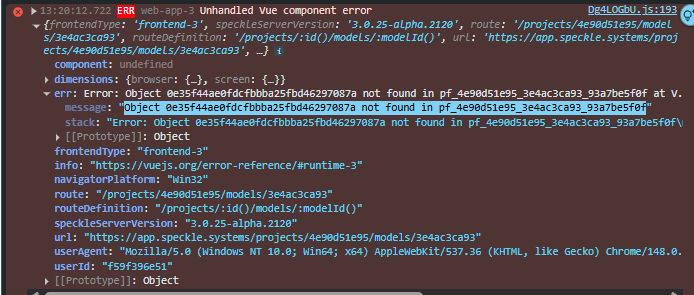
I have the same issue in this project. More specifically it seems the reference object is not found Object 0e35f44ae0fdcfbbba25fbd46297087a not found in pf_4e90d51e95_3e4ac3ca93_93a7be5f0f:
We are running into the same problem where some newer models have way more trouble loading compared to previous versions - and some get hardstuck loading at a certain %, like 50%, depending on the pc, others load, but slower.
Very curious to know what would be the cause and fix for it.
we’ve been debugging this issue and during the debugging I was forcing some versions to load the traditional way. That is the reason why some versions could load for you today. This is not a scalable action as I had to manually intervene for every new version that was published.
There are a couple of factors at play here, but to get a full picture of what is going wrong, we’d need to see what your automate function does. At some point a reference is getting attached to the version, but that reference is never properly resolved, nor is it added to the closure tree of the newly created version hierarchy. This is an undefined behavior that our old viewer loading system is graciously overlooking, but the new loading system cannot find the referenced object and the loading gets stuck.
In my case the models are published through the Rhino Connector - not an automate function. Let me know if I can provide any other info regarding my case.