I’m currently in the process of trying out Speckle Intelligence and specifically the model validation widget to check one of our Revit models against IDS specifications.
First off, THANK YOU!
Seeing what an immense progress Speckle’s data checking and validation features have made in such a short time is very, very impressive.
Also, I find the UI / UX to be super straightforward and easy to use.
I have two questions at this point:
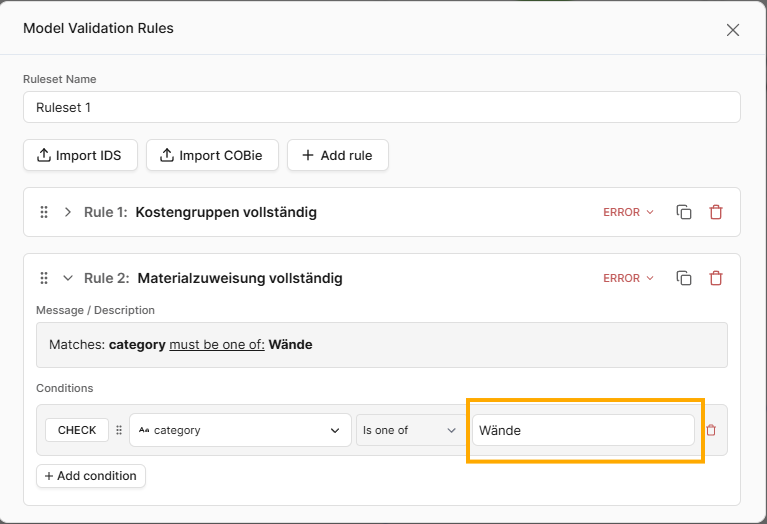
Firstly, I think there’s a bug when manually editing model validation rules. After every character input to the parameter value field, focus switches away from the text box, so you end up having to type every character one by one:
Secondly, when importing / exporting IDS files, how does Speckle convert the parameter classification from the IFC format to its own system of handling parameters? I.E. when importing an IDS file that requires elements to have a parameter called “IsExternal” in the PSet with a name of “PSet_WallCommon”, what happens to this rule when importing the file?
Apart from that, I am extremely happy with the current developments. Keep up the good work!
Thanks again for taking the time to explore this and for the very considered feedback.
Just to restate for clarity: the Model Validation widget, like the rest of Speckle Intelligence, is very fresh and currently in beta. We should make that clearer in the UI, so thank you for bearing with the rough edges and for reporting issues early.
On the editing behaviour you highlighted: you are absolutely right, the focus loss when typing into the parameter value field is a bug. It is not intended behaviour and has been logged for investigation. The screenshots were very helpful here.
On IDS import more broadly, you have identified the core challenge. IDS is defined in IFC terms, while most users are validating native authoring models where those namespaces do not exist. At the moment, the import is intentionally conservative. We avoid hardwiring large sets of IFC to native heuristics because they tend to become brittle and unpredictable across projects, tools, and regions.
Where we want to go is making that translation step more explicit rather than more magical: preserving the original IDS intent as provenance, attempting a best effort match against the parameters actually present in the model, surfacing ambiguity where it exists, and allowing users to confirm or override bindings so behaviour becomes predictable within a project or workspace.
We are building this in the open and are very hungry for suggestions. If there are specific IDS rules that currently feel particularly “lost in translation”, even a small snippet is extremely useful for pressure testing both the import logic and the UX around it.
Thanks again for the report and for kicking the tyres this early.
Thanks for the quick reply. I think I understand the logic and thought process behind the IDS “interoperability” features a lot better now.
I am of course fully aware that this is a very early beta feature that can’t be expected to function perfectly at this moment.
If the end goal here is to translate or map entire IDS specification sets between IFC data structures and native authoring tool data structures, I think there’s no way around a (more or less) manual mapping step. You could of course try to match the parameter names in the IDS against parameter names in the native model data, but certain parameters like name or category are probably too generic to automatically map them to the corresponding property. Maybe it would be possible to save a user-generated mapping for future reuse, so you only have to do it once?
It would also be possible to take a look at the authoring tool’s internal mapping systems for IFC exports and try to reverse engineer them for an “educated guess”. For instance, Revit uses a default preset that looks something like this:
Where the first column is a Revit category, subcomponent or subcategory, the second column is a corresponding IfcClass and the third column is the IFC PredefinedType. This can be further customized, but most offices probably use a version of this mapping table that’s not too different from the OOTB one that Revit uses as default.
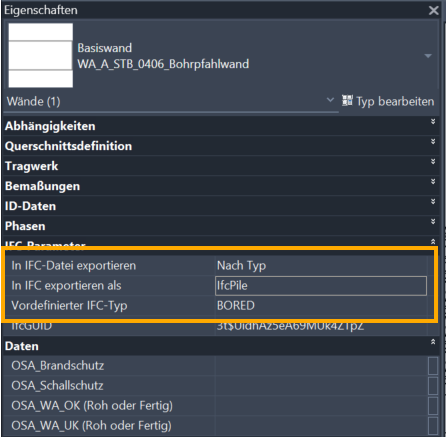
Of course, this is still not nearly 100% reliable because for every single Revit family type or even individual instances this mapping can be overridden in the type or instance settings:
…and additionally, there are even more ways to alter the IFC output via custom mapping tables that apply only to certain elements or parameters, exporting Revit schedules etc. etc.
I think a viable solution would be to take the default Revit mapping for a “first guess” and then let the user check and adjust the settings where needed.
I hope this helps a little with future considerations.
Where I would slightly adjust the emphasis is on where that user effort is captured. Rather than treating the IFC to native mapping as a separate, durable standard in its own right, our preference is to push that time and intent directly into the rule definition itself.
In practical terms, the direction is:
We report clearly when a rule cannot be translated with sufficient confidence
The user corrects the rule by pointing it at the appropriate property in the actual model data
The completed ruleset then becomes the authoritative record of that decision
Assuming a practice has coherent internal standards, that tends to be enough. Once the rule is explicit and validated against real project data, it can be reused as is, without maintaining a parallel mapping layer that can drift or become stale.
This keeps the system honest: we do not silently “guess” beyond a reasonable first pass, we surface uncertainty, and we let the ruleset itself capture the agreed interpretation. The dashboard or exported rule file then becomes the living standard, rather than an abstract translation table sitting beside it.
This is still very much an area that will evolve through real project use, and examples like yours are invaluable in helping us steer toward something that is both powerful and predictable.