I’m testing a simple workflow on Revit connector v3, namely, to reload existing spaces with new / updated parameters. For us this is a vital workflow, which worked properly on Speckle v2. It enables us to:
Retrieve spaces from a Revit model
Run calculations on space data in another application
Store results as parameters within the space objects
Reload the spaces back into Revit, with calculation results
I tested this workflow through following steps:
Published a model with some spaces
Changed some parameters of the Revit spaces within Revit
Reloaded the model from Speckle, expecting parameters to be changed back to their original
Unfortunately, this test wasn’t successful, breaking a major use case for us. Of course I would like to know why this isn’t working as before:
Do I have wrong assumptions on how Speckle v3 should be working?
Is some bug preventing parameters to be imported?
Is it simply not implemented yet?
Or is this change in behavior by design, and is it not planned to support this workflow anymore?
A lot of parameter-writeback workflows sit in the collective folk memory from v2, but many of them were never formally supported. In v3, the Revit connector doesn’t yet provide a reliable way to push updated parameters back into existing Spaces, which is why your round-trip test fails. This isn’t a deliberate change; it hasn’t been implemented yet.
We’re now scoping a dedicated Parameter Updater that would cover the workflow you’re describing. The intent is to let you update parameters on existing elements, no matter where the new values come from; but where do you anticipate making the changes, for example?:
Speckle Intelligence
The main web application
Your own custom app
Jupyter or programmatic pipelines
Any other API-driven process
We don’t expect rapid turnaround on this, but we will have a POC sooner rather than later, and your scenario is precisely the kind of workflow we want to capture.
If you can share a minimal example or the specific Space parameters you rely on, that will help us fold it into the spec cleanly.
Thanks @jonathon, happy to hear it’s still to be implemented.
We will be making parameter changes in various ways, like in our own web apps, but could also be via Grasshopper, using your connector or programmatically via specklepy. Speckle of course supports to make these changes ‘anywhere’ and that’s also how we use it.
As for the Space parameters we use, the generically available Space properties are a good start, see here: Help | About Space Properties | Autodesk
We’re using these mostly for MEP, so parameters like Specified Supply Airflow, Design Heating / Cooling Load are useful, together with more generic parameters such as Level, Area, Base Offset, etc.
However, we also add lots of additional shared parameters that are part of our Revit templates that also get added during calculations. Also these should be able to be passed back into Revit. This worked properly for V2, as long as the custom parameters were already defined within the Revit model.
Does that provide enough context? And is it helpful if I just share a very basic Revit model with some generic and some custom shared parameters?
Do you maybe have an update on this one? It is something we’ve addressed in this topic before and also during one of our meetings with you.
For moving to Speckle v3, this would be a vital workflow for us to be supported, we can definitely run some tests on it if something is available already. Let us know if that would be helpful!
The Parameter Updater is in public beta and supports writing parameter changes back to existing Revit elements:
The current workflow is:
Publish the Revit model to Speckle.
Review and edit parameters through the Parameter Updater widget in a dashboard.
Submit the changes as an Issue.
Open that Issue in the Revit connector and apply the changes to the existing elements.
It requires Revit connector v3.24.0 or later. Existing instance, type and system parameters exposed beneath properties can be updated, including existing shared parameters, subject to what the Revit API permits for the particular parameter. Parameters controlled by Revit, such as some calculated Space properties, may still be read-only.
This first beta does not yet provide the completely programmatic round trip you originally described, where values produced in your own application, Grasshopper or a SpecklePy pipeline can be pushed directly back into Revit. At present, the supported writeback request is created through the dashboard and carried into Revit through an Issue.
That said - the mechanism is pretty clearly open to that albeit the expected action is that there is a human-in-the-loop to accept the suggested/requested changes.
Your Space workflow is nevertheless exactly the sort of test case we need. Testing it against a small model containing both standard Space parameters and your existing shared parameters would be very useful. In particular, it would help us establish which airflow and load parameters can be updated successfully, which are rejected by the Revit API, and what is still needed to support an API-driven workflow properly.
Please give it a try, and share the Issue link and connector error text for anything that does not apply as expected.
I gave it a try to see what we’re able to do with it. In short, the Parameter Updater works pretty nicely through the dashboard, not much complaints there. However, the programmatic workflow is indeed not feasible currently, as you already mentioned.
Parameter Updater → Revit
It’s nice that users get more control over the process of changing parameters, having an overview on which parameters will change. Additionally, it would be cool to have even more fine-grained control over it, potentially rejecting per parameter if they would want.
‘All’ parameters I’ve tried seem editable, that includes our own shared parameters, which is good to see!
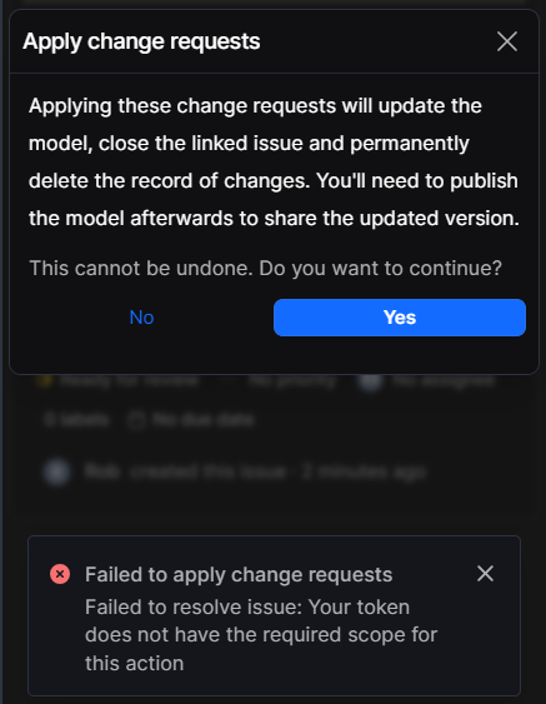
One minor issue I see happening is that I get some errors displayed on not having the right scope for my token. However, the parameter updates in the issue are still performed, so I’m not sure what error is actually happening, and if it’s a real problem. Below the link to one of the issues and a snapshot of the error.
Unfortunately I cannot invite you to the project myself as I’m not an admin of our own workspace, so for now you probably can’t directly access. Guess we can get that arranged if it would help. https://app.speckle.systems/projects/382a0cb2f8/models/525d421bb3#threadId=4d2ee0eda6
This workflow is broken compared to Speckle v2, and it’s something that’s vital for us. We use it in projects to do automatic annotations in Revit spaces, based on updated parameters from our own calculation APIs.
I did a try to mimic Revit parameters in the same structure as they’re coming from Revit itself, to then mark these as issues in the Parameter Updater. This however isn’t working currently. The parameters are not recognized as (editable) parameters, so they don’t work with the Updater. Maybe only parameters that originate from Revit can be used in the Parameter Updater? Or, alternatively, do I need to further align the structure of my data with the structure from Revit?
For us, it would be great if we would be able to add / update parameters programmatically through specklepy, potentially marking them as ‘issues’, in order to get them received back into Revit. Before something as such is implemented, we might need to stick to Speckle v2 in the meantime.