Hi,
When using the ACC connector to sync Revit models, it appears it won’t include the Rooms, is there a way to include it? Also anything else that is not included by default?
Thanks,
Hi,
When using the ACC connector to sync Revit models, it appears it won’t include the Rooms, is there a way to include it? Also anything else that is not included by default?
Thanks,
I assume you set a view to publish by? In that case, if rooms are not visible in that view, it won’t include them. If you don’t set a view, it will publish everything from the Revit file, including the Rooms.
Hey, it’s a defined 3D View but there is no rooms in a 3D view visibility settings in Revit we can switch on/off.
Yeah, 3d views in Revit don’t have rooms. I’ll log this. We’re already planning to do the same in Revit connector. We’ll do it in ACC as well.
Hello, how’s this going to be implemented in ACC? Thanks.
You can for now choose categories to sync in the ACC integration - think syncing Rooms in 3D views hasn’t landed yet.
Hey @brunomc ,
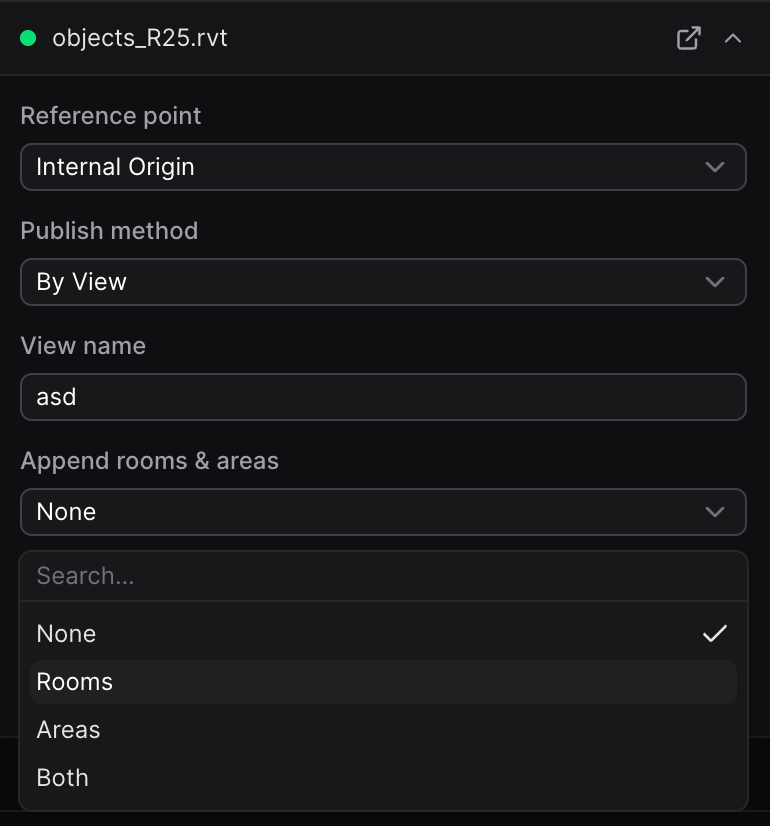
When you sync a 3D View in ACC integration, there is now a new option to Append Rooms and Areas. After you enter view name, you can set it to sync:
Thanks, it works! That’s much improved and the UI as well. One feedback, the ‘selected’ column should allow to scroll down like the ‘folders’ column.
Oops, that’s a bug. I’ll make sure we address it.
This topic was automatically closed after 180 days. New replies are no longer allowed.