Hi all,
I’ve just migrated to the 2026.9 Power BI connector (from Speckle.GetByUrl to Speckle.GetTables) and the new 3D visual. The data side went well — GetTables plus the expand-properties function gives me exactly what I needed, and joining on Object Key is clean.
My problem is on the visual side, and I’d like to confirm whether what I’m seeing is intended behaviour before I redesign my reports around it.
Setup. Model published from DWG. In Power BI I join the model objects to our construction schedule data (Primavera P6) through a GUID property, so each object carries its planned dates and progress. The main question the report has to answer is: “where is this item in the substation?”
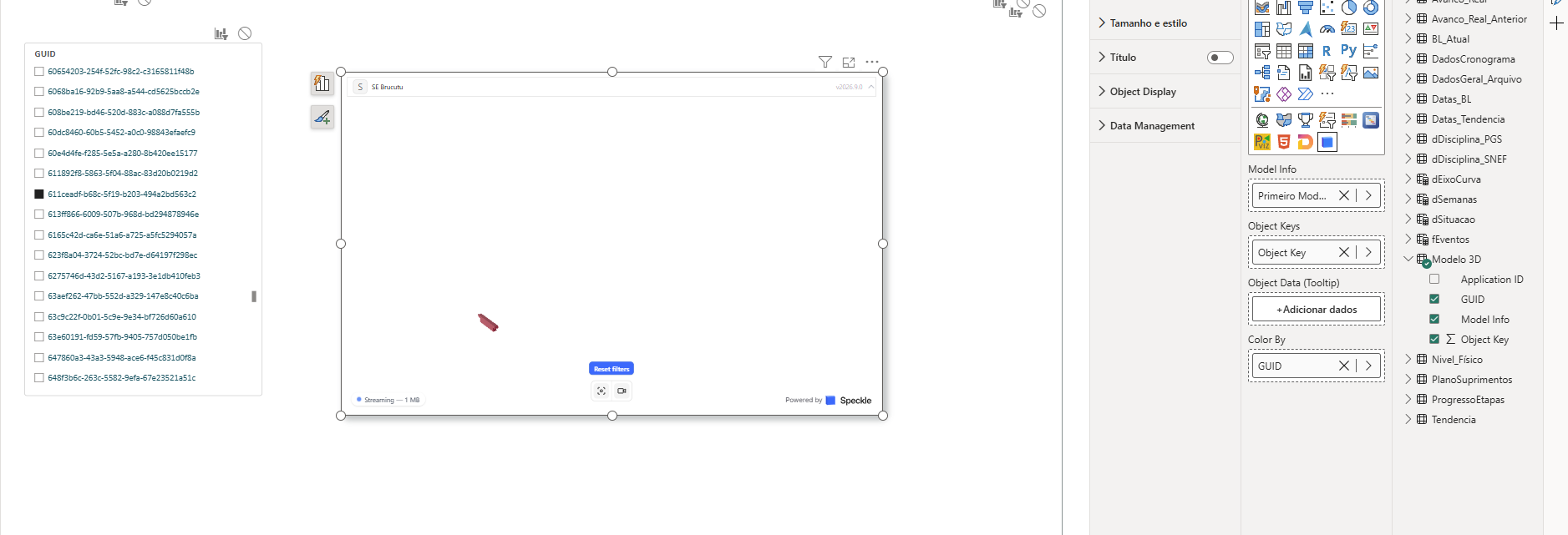
What happens. When I select items — with a slicer, or any filter — every non-selected object is removed from the viewport. I’m left with a single piece floating in empty space, with no surrounding geometry to locate it against. Since the whole point is spatial context, the selection becomes useless for that question.
I found in the 2026.9 docs that section box, view modes, edges, ghosting and named scene views are unavailable, and that filtered-out objects are hidden rather than ghosted. So I understand this is documented — but I couldn’t find any explanation of the reasoning, or whether it’s temporary.
My questions:
- Is the removal of ghosting permanent, or is context display (transparent/greyed non-selected geometry) on the roadmap for the new viewer? Any rough timeline would help me decide whether to wait or rebuild.
- Does the new visual honour Power BI’s highlight semantics as opposed to filter? If I drive selection from a table and set “Edit interactions” to Highlight instead of Filter, should the visual respond, or does it treat everything as a filter?
- Is there a supported pattern to keep the full model visible while emphasising a subset? I tried
Color By, but since the slicer filters upstream, the visual only ever receives the selected rows, so there’s nothing left to colour as context. - On “Move camera on filter”: the camera moves in when the filter is applied but doesn’t return when the filter is cleared. Is that expected, or should clearing restore the previous framing?
Happy to test builds or share a sample report if that helps.
Thanks.