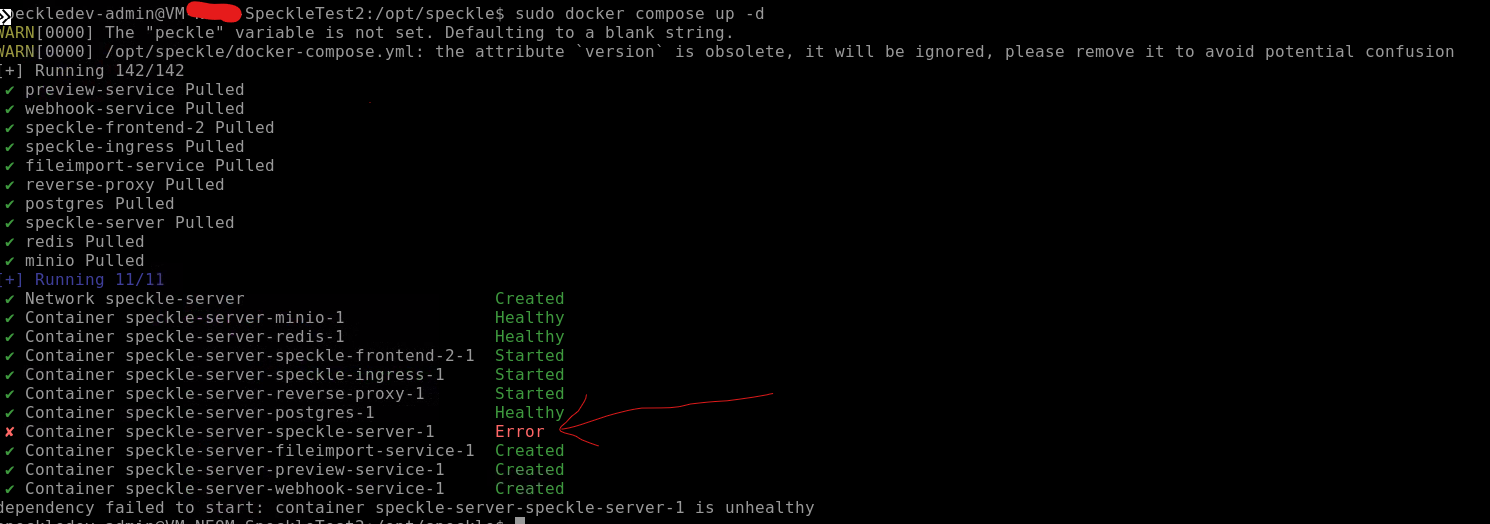
I have a Speckle Server deployed locally in a Linux machine using docker-compose.yml file. However I am unable to upgrade it to the latest 2.26 version
Below is the yml file
version: "2.3"
name: "speckle-server"

services:
  ####
  # Speckle Server dependencies
  #######
  reverse-proxy:
    image: traefik:v2.10
    restart: always
    command:
      - "--providers.docker=true"
      - "--providers.docker.exposedbydefault=false"
      - "--entrypoints.websecure.address=:443"
      - "--certificatesresolvers.myresolver.acme.tlschallenge=true"
      # To use Let's Encrypt staging server instead of production, uncomment the following line
      #- "--certificatesresolvers.myresolver.acme.caserver=https://acme-staging-v02.api.letsencrypt.org/directory"
      # TODO: replace `{[email protected]}` with your actual email
      - "[email protected]"
      - "--certificatesresolvers.myresolver.acme.storage=/letsencrypt/acme.json"
      # To enable the Traefik web UI (enabled by --api.insecure=true); this is not recommended as it will expose the Traefik dashboard to the internet
      #- "--api.insecure=true"

    ports:
      # The HTTPS port (required for Traefik to listen to HTTPS requests)
      - "443:443"
      # The Traefik Web UI port if enabled by --api.insecure=true
      - "8080:8080"
    volumes:
      - "./letsencrypt:/letsencrypt"
      # So that Traefik can listen to the Docker events
      - "/var/run/docker.sock:/var/run/docker.sock:ro"
  postgres:
    image: "postgres:16.9-alpine"
    restart: always
    environment:
      POSTGRES_DB: speckle
      POSTGRES_USER: speckle
      POSTGRES_PASSWORD: speckle
    volumes:
      - ./postgres-data:/var/lib/postgresql/data/
    healthcheck:
      # the -U user has to match the POSTGRES_USER value
      test: ["CMD-SHELL", "pg_isready -U speckle"]
      interval: 5s
      timeout: 5s
      retries: 30

  redis:
    image: "valkey/valkey:8-alpine"
    restart: always
    volumes:
      - ./redis-data:/data
    ports:
      - "127.0.0.1:6379:6379"
    healthcheck:
      test: ["CMD", "valkey-cli", "--raw", "incr", "ping"]
      interval: 5s
      timeout: 5s
      retries: 30

  minio:
    image: "minio/minio"
    command: server /data --console-address ":9001"
    restart: always
    volumes:
      - ./minio-data:/data
    healthcheck:
      test: ["CMD", "mc", "ready", "local"]
      interval: 5s
      timeout: 5s
      retries: 5

  ####
  # Speckle Server
  #######
  speckle-ingress:
    image: speckle/speckle-docker-compose-ingress:2
    restart: always
    ports: []
    #  - "0.0.0.0:80:8080"
    environment:
      FILE_SIZE_LIMIT_MB: "4096"
      NGINX_ENVSUBST_OUTPUT_DIR: "/etc/nginx"
    labels:
      - "traefik.enable=true"
      #TODO: replace `example.com` with your domain. This should just be the domain, and do not include the protocol (http/https).
      - "traefik.http.routers.speckle-ingress.rule=Host(`XXX.azure.com`)"
      - "traefik.http.routers.speckle-ingress.entrypoints=websecure"
      - "traefik.http.routers.speckle-ingress.tls.certresolver=myresolver"
      - "traefik.http.services.speckle-ingress.loadbalancer.server.port=8080"
  speckle-frontend-2:
    image: speckle/speckle-frontend-2:2
    restart: always
    environment:
      NUXT_PUBLIC_SERVER_NAME: "local"
      # TODO: Change NUXT_PUBLIC_API_ORIGIN to the URL of the speckle server, as accessed from the network. This is the same value as should be used for the CANONICAL_URL in the server section below.
      NUXT_PUBLIC_API_ORIGIN: "https://xxx.azure.com"
      NUXT_PUBLIC_BACKEND_API_ORIGIN: "http://speckle-server:3000"
      # TODO: Change NUXT_PUBLIC_BASE_URL to the URL of the speckle frontend, as accessed from the network. This is the same value as should be used for the CANONICAL_URL in the server section below.
      NUXT_PUBLIC_BASE_URL: "https://xxx.azure.com"
      NUXT_PUBLIC_LOG_LEVEL: 'warn'
      NUXT_REDIS_URL: "redis://redis"

  speckle-server:
    image: speckle/speckle-server:2
    restart: always
    healthcheck:
      test:
        [
          "CMD",
          "/nodejs/bin/node",
          "-e",
          "try { require('node:http').request({headers: {'Content-Type': 'application/json'}, port:3000, hostname:'127.0.0.1', path:'/graphql?query={serverInfo{version}}', method: 'GET', timeout: 2000 }, (res) => { body = ''; res.on('data', (chunk) => {body += chunk;}); res.on('end', () => {process.exit(res.statusCode != 200 || body.toLowerCase().includes('error'));}); }).end(); } catch { process.exit(1); }",
        ]
      interval: 10s
      timeout: 3s
      retries: 30

    depends_on:
      postgres:
        condition: service_healthy
      redis:
        condition: service_healthy
      minio:
        condition: service_healthy
    environment:
      # TODO: Change this to the URL of the speckle server, as accessed from the network
      CANONICAL_URL: "https://xxx.azure.com"
      SPECKLE_AUTOMATE_URL: "http://127.0.0.1:3030"

      REDIS_URL: "redis://redis"

      S3_ENDPOINT: "http://minio:9000"
      S3_ACCESS_KEY: "minioadmin"
      S3_SECRET_KEY: "minioadmin"
      S3_BUCKET: "speckle-server"
      S3_CREATE_BUCKET: "true"

      FILE_SIZE_LIMIT_MB: 100

      # TODO: Change this to a unique secret for this server
      SESSION_SECRET: "$peckle@2o25"

      STRATEGY_LOCAL: "true"
      DEBUG: "speckle:*"

      POSTGRES_URL: "postgres"
      POSTGRES_USER: "speckle"
      POSTGRES_PASSWORD: "speckle"
      POSTGRES_DB: "speckle"
      ENABLE_MP: "false"

      # TODO: Change this to the URL of the speckle server, as accessed from the network
      FRONTEND_ORIGIN: "https://xxx.cloudapp.azure.com"

  preview-service:
    image: speckle/speckle-preview-service:2
    restart: always
    depends_on:
      speckle-server:
        condition: service_healthy
    mem_limit: "1000m"
    memswap_limit: "1000m"
    environment:
      DEBUG: "preview-service:*"
      REDIS_URL: "redis://redis"
      PORT: "3001"

  webhook-service:
    image: speckle/speckle-webhook-service:2
    restart: always
    depends_on:
      speckle-server:
        condition: service_healthy
    environment:
      DEBUG: "webhook-service:*"
      PG_CONNECTION_STRING: "postgres://speckle:speckle@postgres/speckle"
      WAIT_HOSTS: postgres:5432

  fileimport-service:
    image: speckle/speckle-fileimport-service:2
    restart: always
    depends_on:
      speckle-server:
        condition: service_healthy
    environment:
      DEBUG: "fileimport-service:*"
      PG_CONNECTION_STRING: "postgres://speckle:speckle@postgres/speckle"
      WAIT_HOSTS: postgres:5432

      S3_ENDPOINT: "http://minio:9000"
      S3_ACCESS_KEY: "minioadmin"
      S3_SECRET_KEY: "minioadmin"
      S3_BUCKET: "speckle-server"

      SPECKLE_SERVER_URL: "http://speckle-server:3000"

networks:
  default:
    name: speckle-server

volumes:
  postgres-data:
  redis-data:
  minio-data:
It would be be really helpfull if someone can let me know the exact version of the different services that needs to be configured in the yml file in order to upgrade the speckle server to the latest build