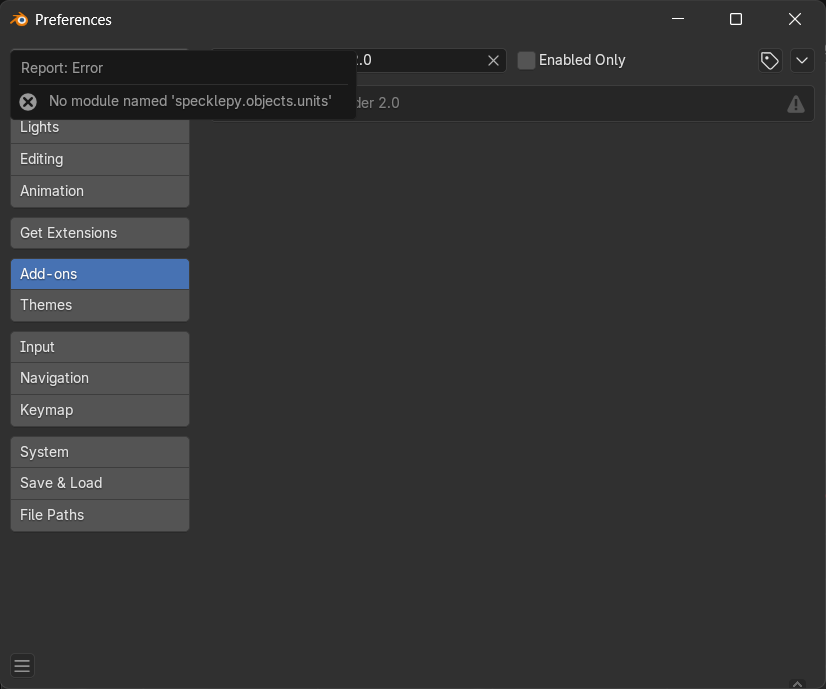
I tried installing the plugin for blender on windows.
I have Blender version 4.4.3. First I tried installing through the manager which didnt work. Then I tried to manualy install 2.23.4 until 2.22.0. All of them displayed the Error Message No Module Named “specklepy.objects.units”
If your installing manually. I suggest you try using the manual zip file available for the blender connector here: speckle-releases
Once downloaded, the zip can be installed via the addons tab of blender’s preferences.
Please note that the v2 (legacy) connector does not officially support blender versions higher than 4.3 - while it may work via this manual install method, we have not been tested or validate anything, nor will we provide support.
For official support for Blender 4.4 and higher, you’ll need to update to the v3 version of the blender connector.
1 Like
Oh, that is cool - the bpy-speckle folder …
Would it be very expensive to offer that service for the latest Blender V3 Beta folders (for Mac and Linux users) ?
We’re not setup right now to offer the same manual zip download on the v3 releases page as we do for the v2.
However, there wasn’t much magic about this before.
You could achieve the same thing by downloading the bpy_speckle folder from the github releases page Releases · specklesystems/speckle-blender · GitHub and running export_dependencies.sh script to generate the requirements.txt required to run the plugin.
So this is still an option for v3 if you must install for unsupported versions/platforms:
- download the release source code zip, and extract
- run
export_dependencies.shscript, - re-zip,
- install via Blender’s legacy addons menu.
However, just a reminder, we won’t help you troubleshoot any problems with this method. We really recommend using our installers, and staying on tested supported blender versions and platforms.
1 Like
Thanks @Jedd !
I tried but I think this is too error prone for me. I already struggled at 2. run export_dependencies.sh script.
First I tried in Terminal
(…/export_dependencies.sh: line 4: uv: command not found)
but I think you may have meant run in Blender
(Python: File “/export_dependencies.sh”, line 2
set -e -o pipefail
^^^^^^^^
SyntaxError: invalid syntax)
I think for now it’s easier for me to boot the Windows PC, install Speckle exe there and bring the bpy_speckle folder over to my Mac.
Ah sorry, I forgot to say, you’ll need to have uv installed (can install via pip)
and your first approach, running in the command line is correct
speckle-blender-3.2.0-beta5 %
/Users/user/Downloads/speckle-blender-3.2.0-beta5/export_dependencies.sh
× No solution found when resolving dependencies:
╰─▶ Because the current Python version (3.9.6) does not satisfy
Python>=3.10.0,<4.0 and specklepy==3.0.1 depends on Python>=3.10.0,<4.0,
we can conclude that specklepy==3.0.1 cannot be used.
And because only specklepy<=3.0.1 is available and speckle-blender
depends on specklepy>=3.0.1, we can conclude that your requirements
are unsatisfiable.
Not that easy for a mere Mac GUI user 
yea, you’re going to need to have the correct python version too. 3.10 or newer
BTW,
Speckle currently offers the 3.0.0 “latest” installer exe for download. (Previously it offered 3.2.0 Beta 4 - or was that linked here on the forum ?)
Isn’t the 3.2 Beta 5 the newer version, although it is a week older ?
I wasn’t successful with the 3.0 versions, even on Windows and AFAIK on Mac it worked since 3.2 Beta 3 and 4.
(Where Beta 4 got the Publish button ?)
But I do not find an EXE for 3.2.0 Beta 5 for Windows.
OMG,
thanks to your your help I was finally able to install and activate Speckle V3 Beta5 in Blender 4.5 Beta and 5.0 Alpha on my M4 Mac.
Both installations work now !
If I can remember the steps until next time, there is no more need to boot the PC - just to upgrade Speckle.
EDIT :
Read about the Final 3.2.0 Release, downloaded, ran script and will update to Final Version.
I found a V3 3.2.0 Final (!) Installer for Windows instead.
Great. Thanks a lot !
This topic was automatically closed 30 days after the last reply. New replies are no longer allowed.