Speckle caching behavior

Hello everyone,

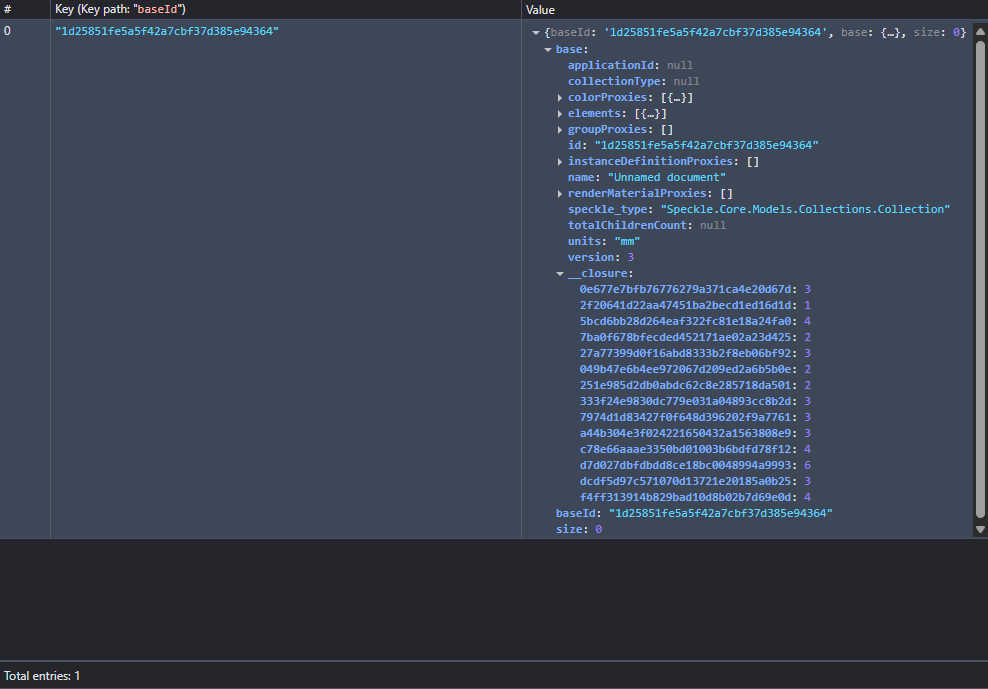
Can I check on the triggering events on caching object data? I was playing around the indexedDB cache and realized when I clear the cache data it won’t be pull back immediately after hard refresh or viewing different models, only the root node data is cached, not its faces, vertices even when i push in new objects. Based on my understanding of the object loader 2 architecture, when pulling models in, if it detects the data not in cache it will then write in it?

sequenceDiagram
    ObjectLoader2->>CacheReader: Root+Children
    CacheReader-->>Database: Item exists?
    CacheReader->>ObjectLoader2: Item exists in Cache
    CacheReader->>Downloader: Item does not exist in Cache
    Downloader->>CacheWriter: Save Item to Cache
    CacheWriter->>Database: Write Item
    Downloader->>ObjectLoader2: Item exists in Cache

Hi zhiyou,

I might need to make that mermaid diagram clearer but an optmization was done to see if the root is cached. If it is cached, then OL2 assumes the rest of the data is and doesn’t download anything. If the root isn’t there, then OL2 rechecks everything and downloads what it needs.

Does that make things more clear or did I misunderstand your question?

Thanks,
Adam

Hey @adamhathcock !

I think I understand what you are saying, however when I clear the whole cache it will check and cache the root data only, hence the screenshot i provided is after I clear the cache, only root data is added but not the rest. Is this intended? Because I thought if the whole cache is empty it will cache the root and other data too.

Thank you for taking your time answering this!

I’m not sure how you get into that situation. I’ve cleared the database and get everything back, as I expected.

Getting only the root object in IDB would cause an issue to have nothing downloaded but I don’t know how you get like that.

Adam

Hi @adamhathcock ,

maybe a video might be clearer, attached below:

https://www.dropbox.com/scl/fi/yg8rfjwccovsz3sj4l5i0/unnamed-rhino-speckle-_-Speckle-Google-Chrome-2025-09-30-16-53-13.mp4?rlkey=gs332311cemazhuhskpfgzor3&st=407cbwev&dl=0

let me know if you cannot view it, thanks!

For that specific example, there may be only one base in that entire model version.

It doesn’t look like anything errors out and there is geometry displayed. I couldn’t see your javascript console but I’m assuming there’s nothing printed out there either.

If there is only one item in a simple example, then that’s how it would work.

Hi @adamhathcock,

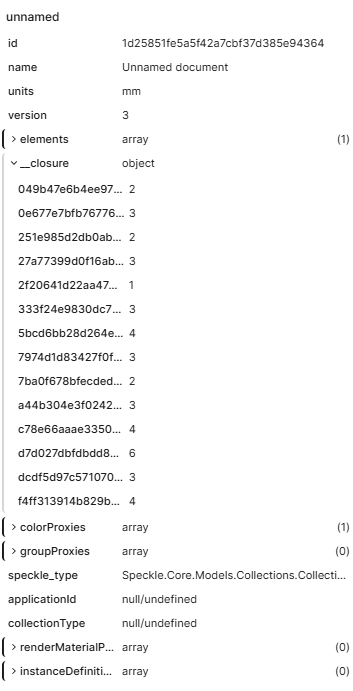
oh maybe I have some misunderstanding on what a base object is, but isn’t every speckle object considered a base object? That includes detached properties like faces and vertices, essentially every reference id in the root node closure is a base object, and if that’s the case then it should have more than just 1 base object right?

Here is my project link
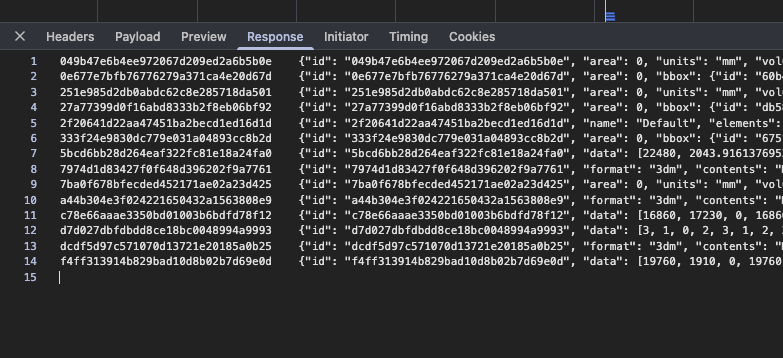
attaching my response for project/object query

gql:
query ExampleQuery($projectId: String!, $objectId: String!) {
  
  project(id: $projectId) {
    object(id: $objectId) {
      data
    }
  }
}

Variables:
{
  "projectId": "1f180e62c3",
  "objectId": "1d25851fe5a5f42a7cbf37d385e94364"
}

Response:
{
  "data": {
    "project": {
      "object": {
        "data": {
          "id": "1d25851fe5a5f42a7cbf37d385e94364",
          "name": "Unnamed document",
          "units": "mm",
          "version": 3,
          "elements": [
            {
              "__closure": null,
              "referencedId": "2f20641d22aa47451ba2becd1ed16d1d",
              "speckle_type": "reference"
            }
          ],
          "__closure": {
            "049b47e6b4ee972067d209ed2a6b5b0e": 2,
            "0e677e7bfb76776279a371ca4e20d67d": 3,
            "251e985d2db0abdc62c8e285718da501": 2,
            "27a77399d0f16abd8333b2f8eb06bf92": 3,
            "2f20641d22aa47451ba2becd1ed16d1d": 1,
            "333f24e9830dc779e031a04893cc8b2d": 3,
            "5bcd6bb28d264eaf322fc81e18a24fa0": 4,
            "7974d1d83427f0f648d396202f9a7761": 3,
            "7ba0f678bfecded452171ae02a23d425": 2,
            "a44b304e3f024221650432a1563808e9": 3,
            "c78e66aaae3350bd01003b6bdfd78f12": 4,
            "d7d027dbfdbdd8ce18bc0048994a9993": 6,
            "dcdf5d97c571070d13721e20185a0b25": 3,
            "f4ff313914b829bad10d8b02b7d69e0d": 4
          },
          "colorProxies": [
            {
              "id": "dd2888dfd991d15c15bedb7e182c411a",
              "name": null,
              "value": -16777216,
              "source": "object",
              "objects": [
                "67bfd040-c5c5-4493-9b0e-8061b7d8c488"
              ],
              "speckle_type": "Speckle.Core.Models.Proxies.ColorProxy",
              "applicationId": "color_Color [A=255, R=0, G=0, B=0]_object"
            }
          ],
          "groupProxies": [],
          "speckle_type": "Speckle.Core.Models.Collections.Collection",
          "applicationId": null,
          "collectionType": null,
          "renderMaterialProxies": [],
          "instanceDefinitionProxies": []
        }
      }
    }
  }
}

Please correct me if I misunderstood any parts, and again grateful for your help :saluting_face:

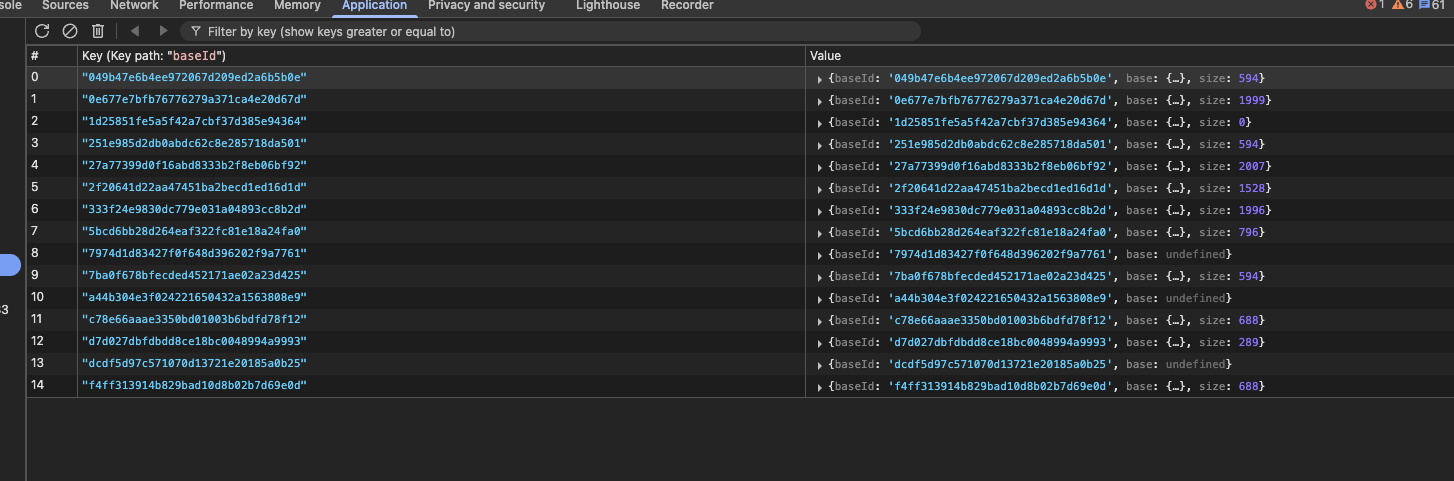
You’re 100% right there that they all should be in IDB. In my test environment, I get everything there but not in the prod environment.

I’m not sure why they’re not cached in IDB (other than browser settings) but they’re definitely gathered as the call to object-stream/ shows as well as there are no JS console errors

Here’s a SS from my test:

Actually, what I think it being shown here is a situation where I’m not finishing the flushing to the CacheWriter as that behavior recently changed.

Normally, it should write everything when disposed correctly. However, the browser may not finish writing everything when dispose happens and the queue just ends instead of flushing out all the values.

1 Like

Hi @adamhathcock ,

Understand, thanks for clearing that up!

This topic was automatically closed after 180 days. New replies are no longer allowed.