I’m using Blender 5.1.1. I installed the add-on following the standard procedure, but the Speckle panel doesn’t show up when I press the N key. I also checked under ** Edit > Preferences > Add-ons** and couldn’t find Speckle there either.
The documentation states that the add-on supports Blender 5.1. Does it not work with 5.1.1 specifically?
For me, latest Blender Connector installed totally flawlessly on Blender 5.1 and 5.2. on my Macbook Pro M4 Max.
I even managed to finally install it on Windows, which I wasn’t able at all with the previous Connector version.
But still, I am not able to get it running on my M1 Mini at all !?
(Although I see and tried to get the exact same installation files, configuration, … as on the Macbook Pro)
I do no more exactly remember what helped where but I think there were 2 main issues.
AFAIR on Windows I noticed that there was still an older Connector installation, which was not activated as it was not activate-able with 5.1 at that time and so only appeared in “AddOn” settings.
AFAIR, once I got rid of the older Connector (maybe by manually deleting all rests in Blender Settings’s AddOn and Extension Folders) I was finally getting the current one installed and working.
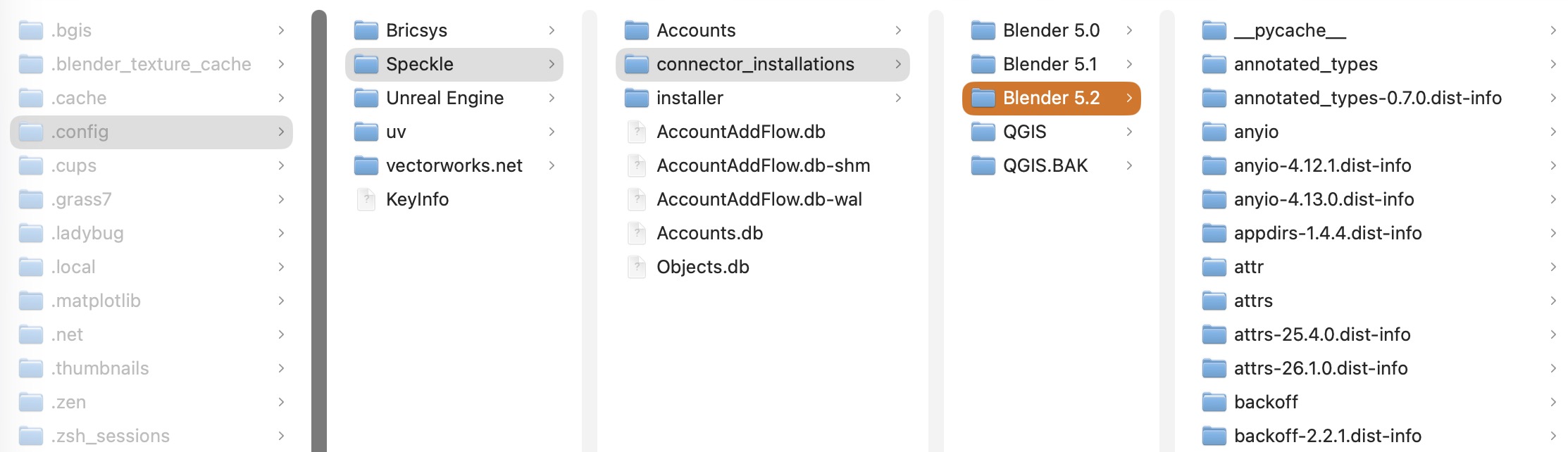
The other problem is with Speckle’s own (often) hidden configuration and installations files. Which completely changed content and location over the years so it is hard to see and check what is current and what is legacy.
There is a connector installations folder for each Blender version and if you find it empty than the was not really installed.
(Like Speckle always refused/failed to install on Alpha, Beta and RC versions of Blender and newer official releases needed quite some time until they were accepted)
In many cases it helped to just copy over the complete content of an older Blender version into the refused newer version …