Thank you for seeking help! Our friendly community is here to assist you. 
To assist you better, please consider providing:
-
Speckle Status: Please check that our systems are up and running: https://status.speckle.systems/
-
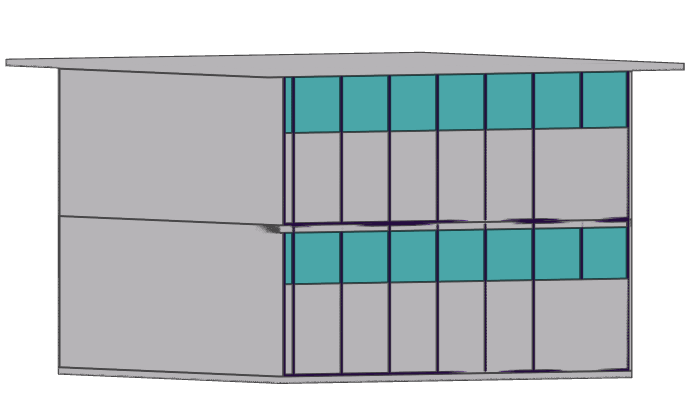
Objective: I am trying to export elevations from the Speckle Viewer with objects color coded.
-
Issue: I can assign colors to the objects properly but am dealing with the issue of ‘white’ not appearing as white, but grayish. I would like some help in figuring out how to change object colors to pure white.
-
Example:
In my code, I am getting all the nodes which have properties that I can identify as Facade Modules (a custom class), and properly assign the colors to them. Everything which is not a Facade Module should be white.
    try {
      viewer.getWorldTree().walk((node: TreeNode) => {
        if (isFacadeClass(node)) {
          const globalId = node['model']['raw']['GlobalId'];
          if (globalId && globalIdToColorMap.has(globalId)) {
            const color = globalIdToColorMap.get(globalId)!;
            // If this color hasn't been seen, initialize its array.
            if (!colorUpdatesMap.has(color)) {
              colorUpdatesMap.set(color, []);
            }
            colorUpdatesMap.get(color)!.push(node['model']['id']);
          }
        } else {
          if (
            prepareForExport &&
            node['model'].hasOwnProperty('renderView') &&
            node['model']['renderView'] !== undefined &&
            node['model']['renderView'] !== null
          ) {
            nonFacadeNodes.push(node);
            colorUpdatesMap.get('FFFFFF')?.push(node['model']['id']);
          }
        }
        return true; // Continue walking the tree
      });

      const colorUpdates = Array.from(colorUpdatesMap.entries()).map(
        ([color, objectIds]) => ({
          color,
          objectIds,
        })
      );

      if (colorUpdates.length > 0) {
        this.filterExtension.setUserObjectColors(colorUpdates);

      }