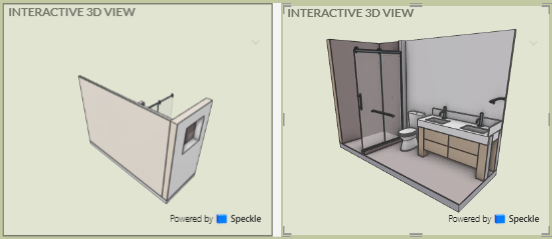
Sorry if this has been asked before - I can’t seem to find it. When I insert my 3D Speckle View into Power BI it doesn’t keep the orientation, even though I have linked it to my saved view in Speckle. Does anyone know a way to save the orientation? Some come in find but some have be looking at the back of my model.
Chat said I may need to “Wait for Speckle to add camera persistence to their Power BI connector.”
Just a bit of background on me and why I asked the question. My name is Link Ellis, and I am the Archicad Technical Director at BIM6x. We support over 1000 Archicad users in our US territory. I also support my wife’s interior design firm, Ellis Interior Design, here in Ketchum, Idaho.
The question is prompted by our effort to import single rooms from Archicad into Power BI using the Speckle connector. Not the whole house. And despite setting the view correctly in Archicad, they quite often turn around in Power BI, and the first preview shows the back of the wall.
I’d also like to add that since saving large Archicad models to Speckle can slow to a halt, especially with the data we need included, saving rooms or partial models is much more user-friendly. That said, it would be far better if we could use Archicad’s Publisher to achieve that, so we can export them all at once. I know the process currently requires a selection, but perhaps it can all be incorporated into your API.
Just a suggestion. Thanks again, and I look forward to your reply.