I am currently experiencing issues with the connector in Power BI. When retrieving data for Speckle, I am encountering very long loading times, and sometimes the loading process is interrupted.
One row is loaded per second, which takes approximately 60 minutes for a larger model. However, this only occurs with certain models from the same project.
I am using connector version 2.20.1.
What can I optimize to make the loading time faster again?
You are using a very very old connector. The current version is 3.5.5.
You will need to install the new connector from here Connectors | Speckle - and also update the dashboard using the new connector. You will need to receive the data again and replace the 3D Viewer.
I had already installed the new version, but it was still displayed in Manager for Speckle. Unfortunately, this did not improve the situation. As mentioned, this does not occur with every model.
Speckle Manager is deprecated for over a year now, you shouldn’t really use it anymore, except if you are still using V2 connectors to support old workflows.
You need to:
download and install the latest version from here Connectors | Speckle - No Manager
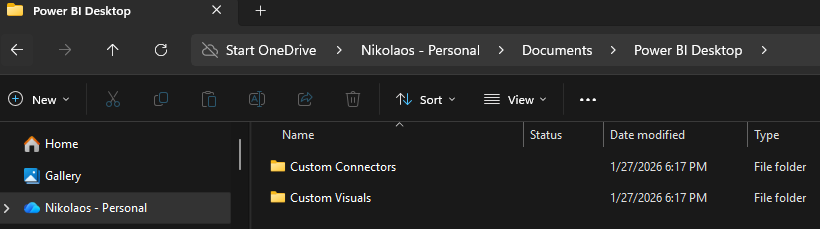
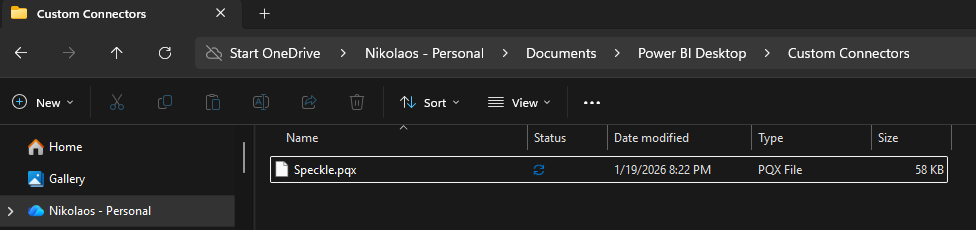
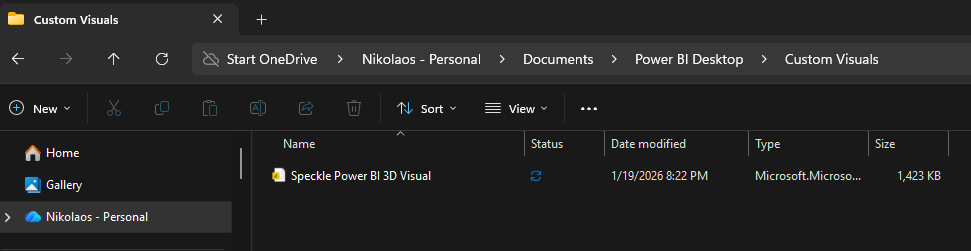
make sure under the folder structure Documents>Power BI Desktop you have these two folders.
See the creation date in the files. It shouldn’t be older.
After you do this, open power bi and import the data again using the same way and make sure to upgrade the 3D Viewer with the new one.
The latest version provides the best performance. Now, if one model is bigger than the other then you will experience differernt loading times.
But first make sure you are using the latest version, otherwise we cannot really help.