Hi Speckle community 
I’m a structural BIM engineer in Japan, and I’d like to share MakeBuildingPro (MBP) — a Grasshopper plugin I’ve been building solo for half year. But before any feature list, let me name the problem it exists to solve, because I suspect many of you live it too.
Data labor. That’s my name for the mechanical work that follows every design change: rebuilding the model, re-exporting the analysis file, redrawing framing plans, updating quantities, re-issuing the deliverables everyone coordinates around. Work that produces no new decisions — it only re-synchronizes artifacts that drifted apart. In structural practice it quietly eats a terrifying share of the week, and it’s precisely the work that makes teams afraid of design changes.
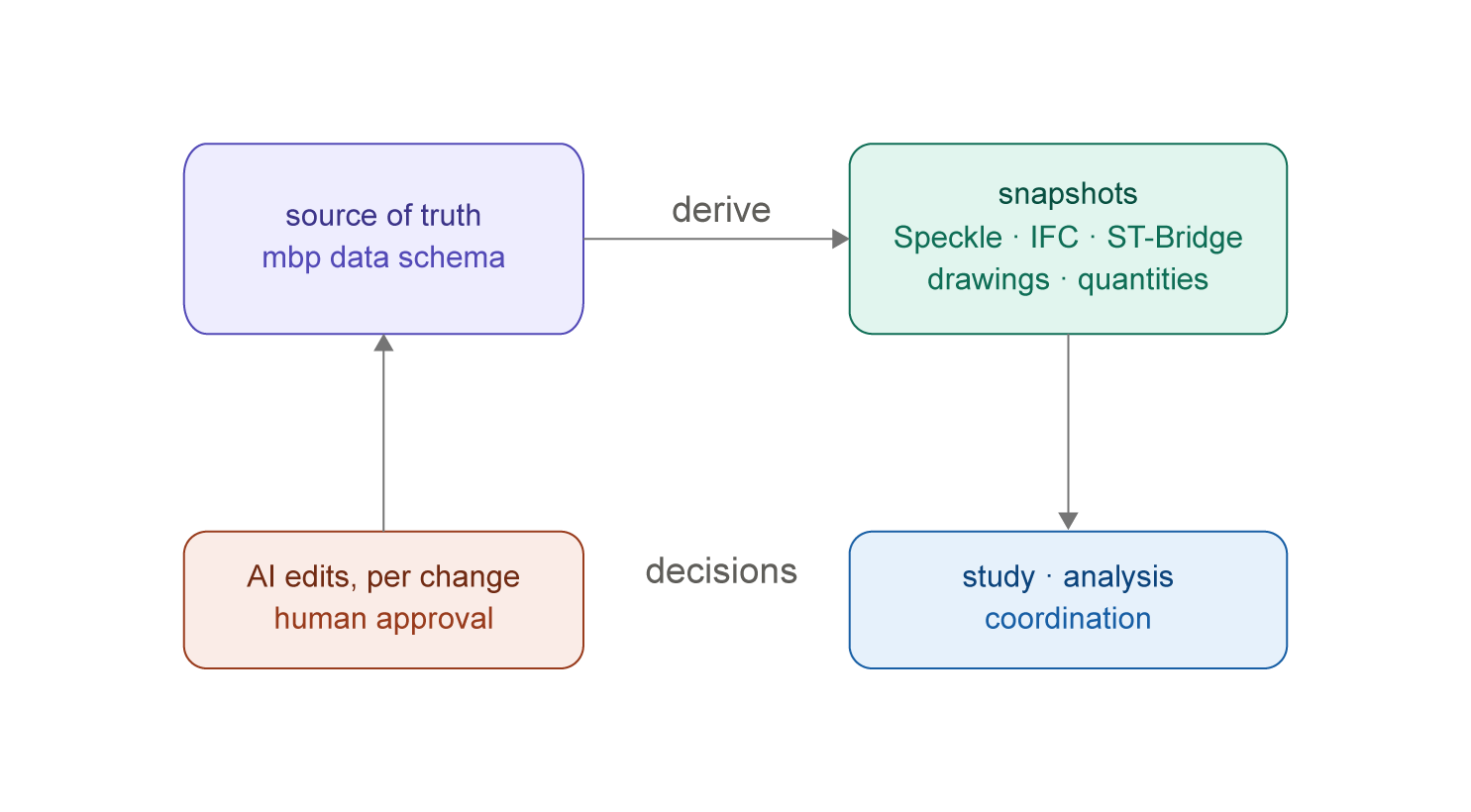
The idea: one source of truth; everything else is a snapshot
MBP treats a building as structured data first — a deliberately light schema (grids, levels, member catalogs, layouts, loads: 34 categories, every position referenced by grid label, readable by a human). You bootstrap it with one line of text:
Office, 5F, 4x3, cut:NE 2x1
…and refine it in spreadsheet-style editors with undo/redo — or in Excel itself. The source round-trips through Excel / CSV / JSON, so it lives wherever you like to edit data.
Everything else is derived: the 3D model, the centerline analysis model, framing plans and sections, quantity takeoffs, IFC, ST-Bridge — and the Speckle send. Change the source, and the artifacts regenerate in seconds inside Grasshopper. Irregularity is data too: voids and setbacks are Is_Void records you can always restore; moved grid intersections (Grid_Nodes) turn grid lines into polylines and floor bays into true quadrilaterals — flowing through one shared resolution core into the model, drawings, quantities and exports alike.
Snapshots flow one way — on purpose
Here’s the design decision I most want to discuss with this community: derived outputs never come back.
An exported analysis model isn’t a second master waiting to be reconciled — it’s a snapshot of the source at a moment. You study it in ETABS or GSA, you learn something, the design moves. At that point you don’t patch the snapshot; you change the source and cut a new one. What returns to the source isn’t data — it’s decisions.
And that’s exactly where AI earns its place in the loop. You tell Claude (or Cursor / Cline) what was decided, through the MCP server that ships inside the plugin — a single ~43 MB executable, 51 tools, zero Node.js setup:
“The north edge has to follow the site boundary — move X1-Y3 east by 450, add a braced bay on X1, then validate.”
The AI edits the source, and nothing lands silently: every change appears in a Git-like approval list — unchecked by default, audit-logged — and the same validation rules that gate my edits gate the AI’s (node-order and convexity rules, quality lints on deformed bays). I approve, the model regenerates, new snapshots flow out.
Where Speckle fits — and why we’re all-in
For MBP, Speckle is the distribution and version layer for snapshots:
- Each send is a version. A project’s design history becomes a browsable sequence of moments — shareable in the browser with people who will never install Rhino.
- Per-member DataObjects. Every column / beam / secondary-beam span / slab is its own object with
mbp_*properties andparent_instance_idlinks, grouped by type — so downstream tools and scripts can address a single member instead of digging through a merged mesh. - Three send modes:
Viewer(light, for communication),Analytical(wireframe + nodes, with a target selector for ETABS / GSA / SAP2000 / Midas iGen — tool-specific property hints ship for ETABS today, the others receive the common structural schema) andPhysical(justified solids for Revit / Tekla). - Fidelity over convenience. Lossy modes preserve original values in properties (
mbp_offset_start_z); the root collection carriesmbp_grid_nodes_jsonso a receiver can reconstruct the actual folded grid, not just the nominal one; and when Analytical mode intentionally skips foundation geometry, the send tells you, with exact counts — instead of staying silent.
To be explicit about positioning: MBP is not a platform, and it doesn’t compete with Speckle. It’s an authoring tool for the structural source of truth; Speckle is the pipe and the memory. The bigger the Speckle ecosystem grows, the more places our snapshots can go — and I hope a steady stream of well-structured structural models is a good deal for Speckle, too. Partners, not rivals.
Why bother?
Because the point isn’t the plugin — it’s what the hours are for. Structural engineers and structural BIM staff burn their best hours keeping artifacts in sync. If the mechanical loop (change → remodel → redraw → re-export → re-communicate) collapses into change → approve → regenerate, the freed time can go where our professions actually add value: design judgment, verification, coordination — the thinking parts of the job. If you’ve been wanting to shift your role in that direction, MBP is built for you.
A few numbers
- 51 MCP tools (26 read / 25 write) — writes opt-in, sandboxable (
MBP_ROOT), file-locked with atomic writes, rotating backups and undo - 34 data categories (16 catalogs + 18 layouts) in a deliberately light schema
- 6 output formats (Excel / CSV / JSON / Speckle / IFC4 / ST-Bridge)
- 3 optional LLM providers (bring your own key) — the one-line generator itself is rule-based and free
- Regression discipline: six permanent fixture buildings re-exported and byte-compared on every release (volatile fields masked) — a data file that doesn’t use a new feature stays byte-identical
What I’d love feedback on
- The one-way stance. Does “one source of truth + disposable snapshots” match how you actually use Speckle — and where does it break? When have you genuinely needed geometry to flow back into an authoring tool?
- Carrying app-specific source data through Speckle — the raw node-offset records ride a root-collection property (
mbp_grid_nodes_json). Right pattern, or would you model it differently (per-object properties? a dedicated collection?) - The approval UX — every AI change default-unchecked: right call, or too much friction? What would it take for you to trust an AI edit to a structural model?
- Speckle Automate on snapshots — if every design moment lands as a version, what would you run against it? Checks, diff reports, notifications?
Try it
Rhino 8 (Windows) → _PackageManager → search "MakeBuildingPro" → Install
- Docs : https://docs.makebuildingpro.com · Contact: [email protected]
Free to try (50 elements per category; Pro trial is 14 days, no card). I’m also looking for the first 5 serious testers — 6 months of Pro free in exchange for honest feedback and permission to write up your use case. Reply here or email me.
Built and maintained by one person, so please be patient with response times — but I read every message. Thank you Speckle team and this community for building the substrate that makes this whole way of working possible.
— panna (X