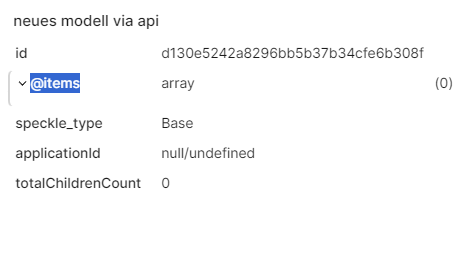
Hello,
I wrote some code that creates a new model in an existing project within a workspace, and I want to fill the model with the geometry from a .3dm Rhino file. Basically, I want to create a speckle model of a Rhino model using specklpy 3.2.0.
However, my model is empty, so I’m wondering what I’m doing wrong.
If there is an entirely different way to do this, please let me know.
Here is a snippet of the relevant code:
import rhino3dm

# Load local file
model_3dm = rhino3dm.File3dm.Read(r"...\filepath\TestModel.3dm")

root = Base()
root["@items"] = []

# here I convert Rhino Mesh to Speckle Mesh
for obj in model_3dm.Objects:
    geo = obj.Geometry
    if isinstance(geo, rhino3dm.Mesh):
        vertices = []
        faces = []

        for v in geo.Vertices:
            #vertices.extend([v.X, v.Y, v.Z])
            vertices.append(Point(x=v.X, y=v.Y, z=v.Z))

        for f in geo.Faces:
            if f.IsTriangle:
                faces.extend([3, f.A, f.B, f.C])
            else:
                faces.extend([4, f.A, f.B, f.C, f.D])

        speckle_mesh = Mesh(
            vertices=vertices,
            faces=faces,
            units=Units.m
        )

        root["@items"].append(speckle_mesh)

#(In this part of the code I create the client, authanticate it with my token, get my workspace and the project inside of it and create a new model)

# Here I send the root object containing the meshes
transport = ServerTransport(
    stream_id= project.id,
    client=client
)

hash = operations.send(base=root, transports=[transport])

input = CreateVersionInput(
    objectId = hash,
    modelId = model.id,
    projectId = project.id
)
version = client.version.create(input)