Installs and works fine (as expected) on Windows too.
1 Like
thanks for this release, saved me hours !
Any chance to get a linux zip installer ?
Hey @gokermu - finally got a chance to test this latest release. Thank you for your work on the recent requests from many of the Blender users here.
Blender 4.5.0, Speckle 3.2.1
Pros:
- Tracking by applicationId works well. It correctly updates and resets meshes/objects that have been renamed.
- Existing material settings are preserved
Cons:
-
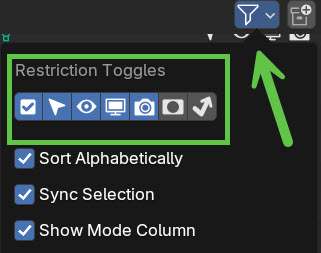
Finding a lot of inconsistencies with hiding collections/objects. “Hide in Viewport” (eye icon) and “Disable in Renders” (camera icon) is preserved for collections when the model is refreshed but doesn’t work for individual objects.
“Disable in Viewports” (monitor icon) is not supported at all via collections or objects and is even more useful than the hide feature since it’s permanent. Hiding (eye icon) is meant to be temporary.
Suggested fix: preserve all “Restriction Toggles” set on the collection AND object. There’s several more that are toggled off by default in Blender (see attached). We use nearly all of these toggles for every single project.
-
Preserving modifiers didn’t seem to work for me on refresh. Tried Array and Bevel and neither were preserved.
Waiting to test:
- Preserving ANY materials added to an object, not just adjustments made to existing. We rarely use existing materials and instead will replace with prebuilt shaders.
- Metadata from Revit
- Instanced objects from Revit
Thanks for your continued involvement with this plugin!
Hey @mseawell ,
Thanks for the thorough review. Indeed, we don’t support all visibility settings but only Hide in Viewport, Disable in Render and Disable selection are preserved. I’ll try to include others as well.
It should work. I’ll see if i can reproduce the issue.
This doesn’t sound right. Can you share a screen recording demonstrating the issue?
i am able to preserve modifiers which is amazing!! however if i add a geometry node modifier, it retains the modifier however all the nodes are deleted or reload of the model?
Hey @modusforma ,
We haven’t tested this with Geometry nodes to be honest. If you can share a minimum reproducable file, we can take a look.
3 posts were split to a new topic: Show diffing of impending receive action Blender and beyond
just start a geometry node on any object you are bringing in via speckle - the modifier will stay on reload, however it wipes out all the node group.